

The AI teammate your whole team can talk to.

Beni is a collaborative agent that lives in your team's chat. Anyone can ask, the channel decides, and everyone watches the work happen live: the slides it builds, the sheet it fixes, the page it reads.

Add to Slack Add to Teams Try it out

No card, and billing isn't live yet. While we're in pilot we switch each new Beni on by hand and tell you in Slack, Teams or by email when it's ready.

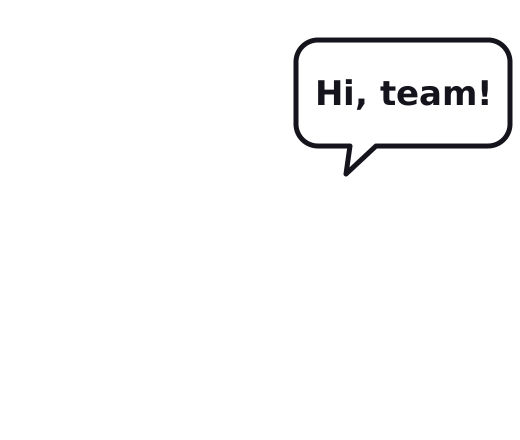
Beni, a line-drawn teammate, waving and saying: Hi, team!
#acme-client alice, bob, Beni
  1. alice

    the title on slide 2 should be 'Q1 kickoff – final'

  2. bob

    yes agreed

  3. Beni

    Change slide 2 title to Q1 kickoff – final?

    Now: Q1 kickoff · deck.pptx · proposed by @alice, agreed by @bob

    Yes, change itNo

    Approved by @bob at 20:54

  4. Beni

    Done: slide 2 title is now Q1 kickoff – final (approved by @bob).

Live work deck.pptx · slide 2 of 3

Updated for everyone in #acme-client

A replay of a run we tested on 20 October 2026: two people agree, Beni asks, one click, the slide changes for everyone. Real screenshots below.

One agent, the whole team's work.

Beni takes requests from everyone in the room, keeps each person's work private, and hands the team finished work, not instructions.

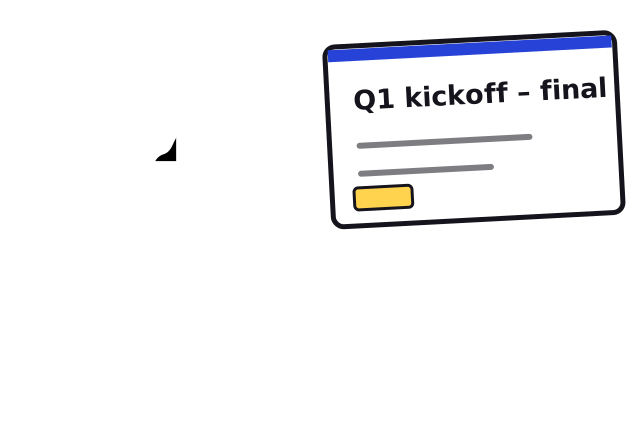
Beni pointing at a slide titled Q1 kickoff – final
  • Works for each of you, and for all of you

    A private Beni for every person, one shared Beni for the team.

    Built
  • Joins your meeting and takes the notes

    Summary, decisions and proposed tasks in the channel when the call ends. In Teams, notes from the meeting transcript.

    Built in Benigo Teams: pilot
  • Reminds you, or the whole team

    "Remind me in 2 minutes to call Dana", or "every weekday at 9, remind the team to post standup". Beni posts the reminder word for word in the same conversation, once or on repeat.

    Live in Slack, Teams and Benigo
  • Catches you up on a channel

    Ask your own Beni, in a DM, what was decided in #standup yesterday. It reads only channels you're a member of and answers with links to the messages.

    Slack: pilot Teams soon
  • Writes the deck, the sheet, the report

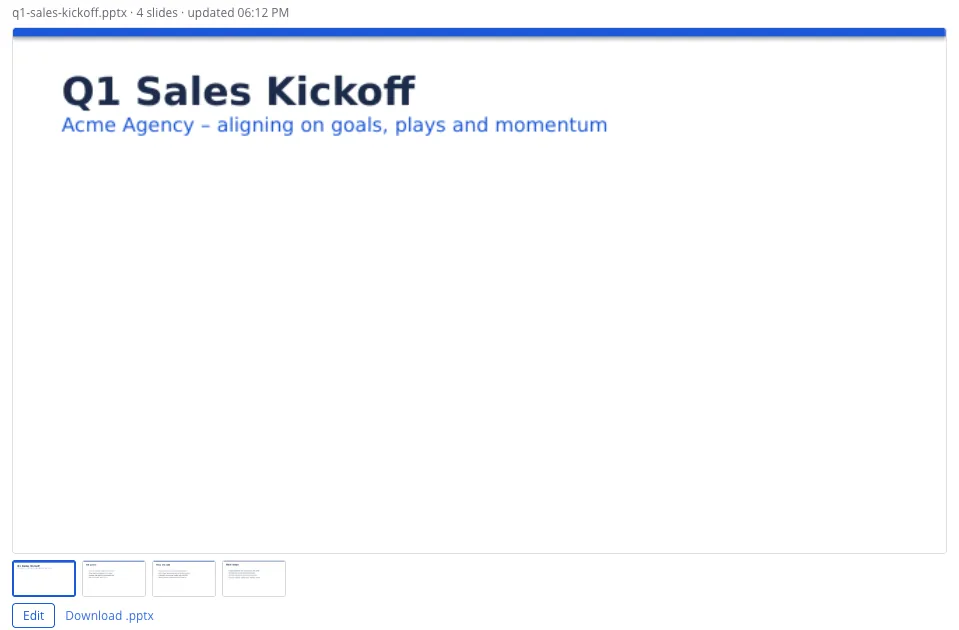
    PowerPoint, Excel and Word files you can open, edit and send. In Teams they land in your OneDrive as a native file card; in Slack as the file, a PDF and slide images. Decks can come from our deck engine, which checks every number and word against your sources.

    Built Deck engine: built (pilot) Slack and Teams: pilot
  • Sends the email, with your OK

    Drafts and sends from Gmail or Outlook. Nothing leaves until the person who asked presses Approve.

    Rolling out
  • Keeps your CRM up to date

    Logs the call, moves the deal, adds the task in HubSpot, Salesforce or Pipedrive.

    Rolling out
  • And every tool you give it

    700+ Apps, 6,000+ Actions. Each person connects their own accounts, and Beni asks when a request needs one: "I need your Outlook or Gmail for this. Connect one?"

    Asking to connect: live in Benigo
    See the apps

Don't wait for a reply. Watch the work.

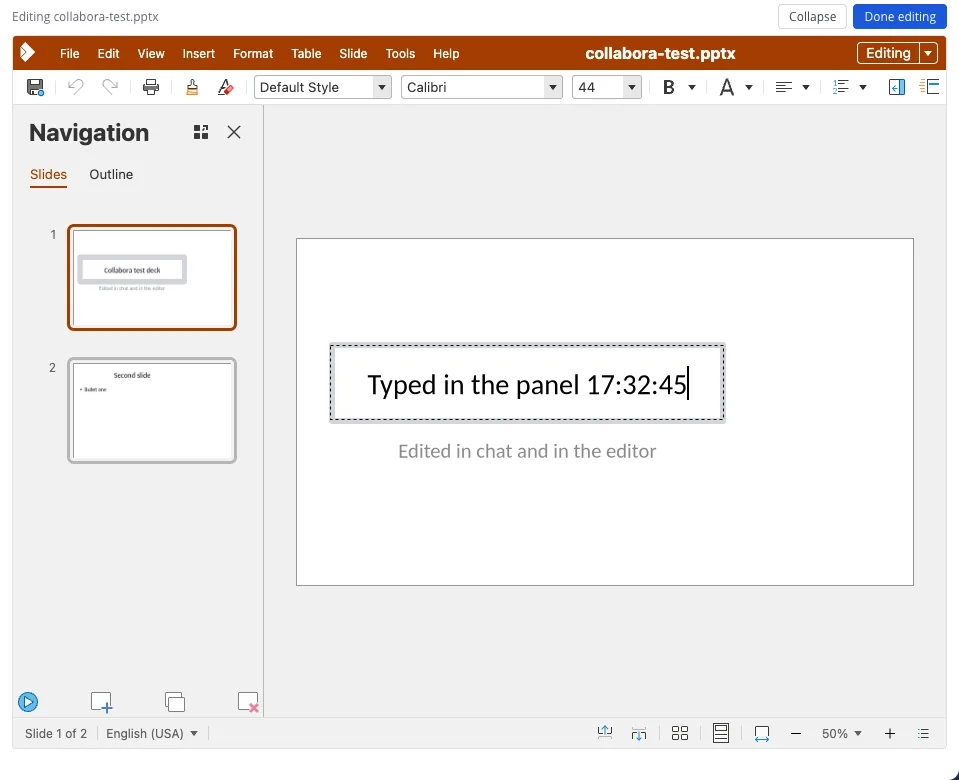
Beni keeps the chat short. The detail goes to the live panel beside it: every deck, sheet and doc it touches renders there as it works, and the panel follows what the channel is talking about. These are screenshots from our pilot workspace, not mock-ups.

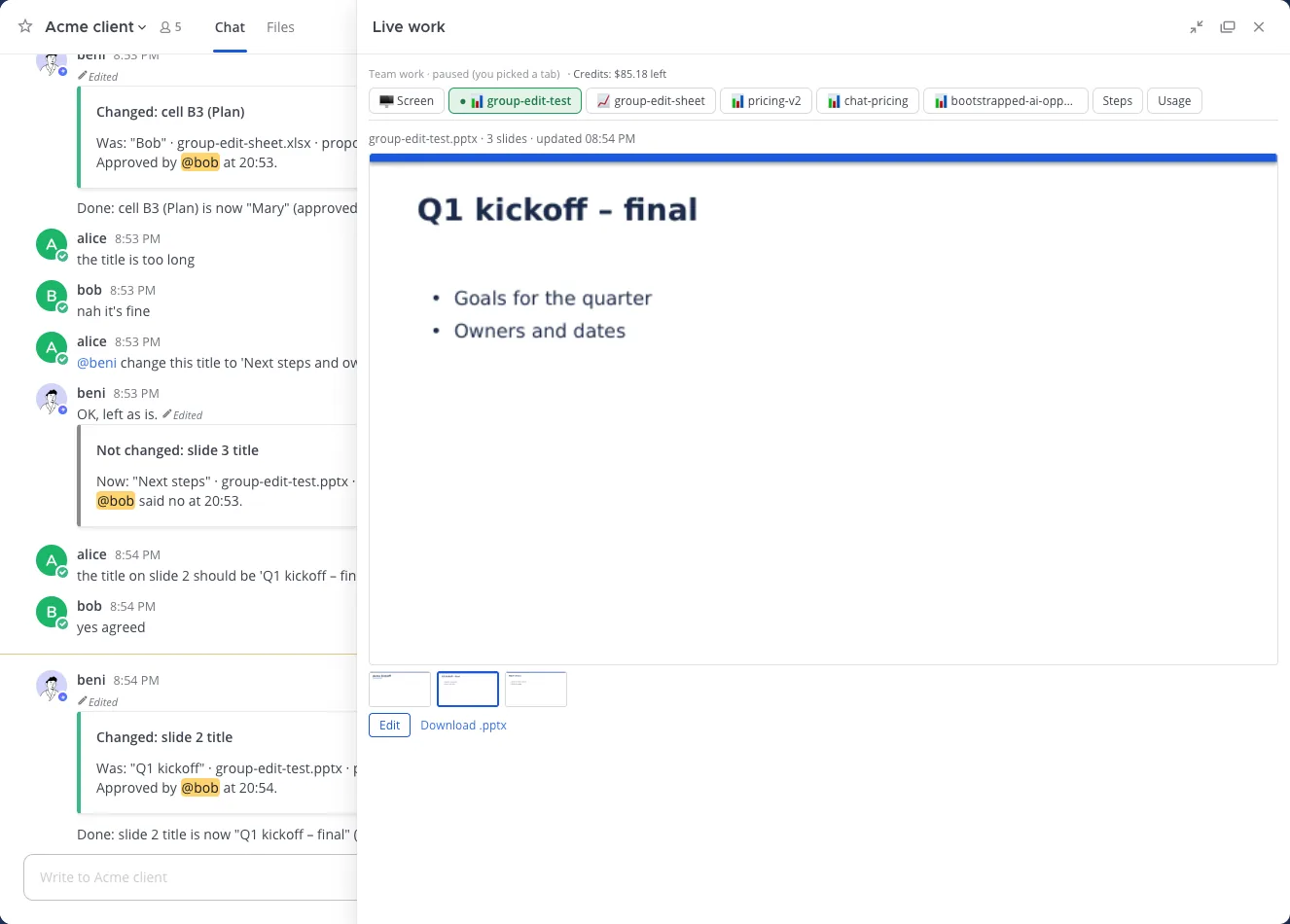
Team channel where alice and bob agree on a slide title; Beni posts approval cards and the live panel shows the slide with the new title 'Q1 kickoff – final'.
The channel agrees on a change, Beni proposes it, a teammate approves, the panel re-renders the slide.

Beni can also stream its browser screen into the panel while it researches, so you see the pages it reads.

Multiplayer by design.

Made for a room full of people, not one person and a chatbot. Teamwork with your agent means the people decide, Beni does the work, and everyone sees it happen.

  1. The channel decides. Beni does the edit.

    When teammates agree on a change to the file on screen, Beni asks once with a Yes/No card and changes it for everyone. It only uses words someone actually typed, and it checks that the file hasn't moved under it.

    Built and tested
  2. Your own private Beni. One shared Beni for the team.

    Every person gets a private Beni with its own memory and its own sandbox. What you tell it in a DM stays there; the team Beni and your teammates' Benis can't read it. Team channels are shared knowledge, and we say so plainly.

    Built and tested
  3. Reads the room. Speaks when it matters.

    You don't have to @mention Beni every time. A small, cheap check reads each channel message and decides whether it's meant for Beni. Everything else, it lets the people talk.

    Built and tested
  4. In the meeting, too.

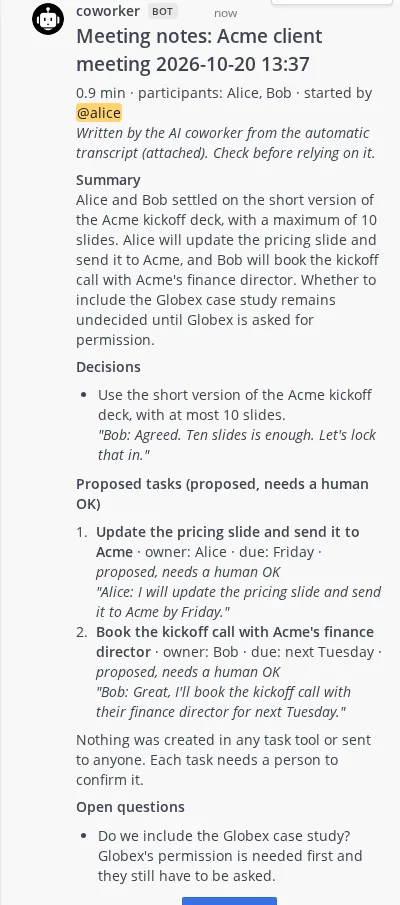
    Start a call from the channel. Beni writes the notes, the decisions and the tasks people committed to, each marked proposed until a person confirms it. Nothing is sent anywhere on its own. In our pilot workspace you can also ask Beni a question out loud; today the answer takes 10 to 15 seconds.

    Working in our pilot workspace
    Meeting notes posted in a thread: summary, decisions, and two proposed tasks with owners and due dates, each needing a human OK.
  5. Small apps for your team.

    Ask for a tracker, a form or a dashboard and Beni builds it, opening beside the conversation for the whole team.

    Coming later

Where your team already talks. Then one place for all of it.

Beni goes where the conversation is: chat today, then email and phone. Our own workspace, Benigo, puts chat, meetings, documents and Beni in one product, so nothing is scattered across apps.

Microsoft Teams

Chat with your private Beni in a DM, add it to channels and group chats, and open the live panel as a Teams tab. Decks, sheets and documents Beni makes in your DM are saved to your OneDrive and arrive as a Teams file card that opens in PowerPoint, Excel or Word inside Teams. An edit saves a new version of the same file.

Pilot

Slack

DM your private Beni or mention it in a channel. A deck arrives as the real file, a PDF copy and its first slides as images, in one message, with an "Open live view" card. After an edit, only the changed slides arrive as v2 and the card updates in place.

Pilot

Benigo workspace

Team chat, video meetings, shared documents and Beni, built together. Running today as a private pilot; the screenshots on this page come from it. Next: your team's own platform, with everything in one place.

Private pilot

Email

Write to Beni at its own address, or let it work through your Gmail or Outlook, with your OK before anything is sent.

Coming soon

Phone

Call or text Beni. Talking to Beni already works in meetings in our pilot workspace.

Coming soon
Microsoft Teams chat with Beni
  1. Beni

    Here is q4-plan.pptx. Open it below to view or edit it in Teams.

    q4-plan.pptx

  2. Beni

    Updated q4-plan.pptx (version 2). It's the same file in your OneDrive.

    q4-plan.pptx Version 2

Slack DM with Beni
  1. Beni

    The deck is ready: three slides on the Q4 plan.

    q4-plan.pptxq4-plan.pdf

    q4-plan.pptx · 3 slides · v2

    Open live view
  2. Beni

    v2: slide 2 changed.

Recreated from our live tests in Slack and Teams on 21 October 2026. The file and its slides are made up for this page. In Slack, the "Open live view" card is the same message, updated in place after an edit.

How a pilot starts

  1. We set Beni up with you in Slack, Teams or a Benigo workspace.
  2. Each person connects their own tools. Reading is automatic; writing asks first.
  3. Talk to Beni where you already work. Mention it in a channel, or DM your private Beni.

Approvals a prompt can't talk its way around.

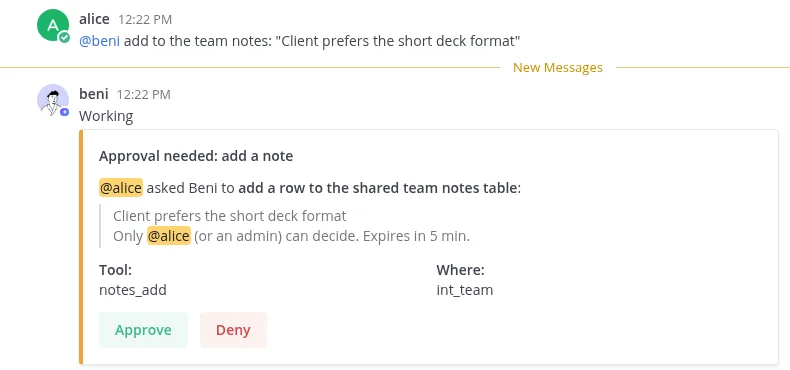
Before Beni writes to a shared tool, it posts a card. Only the person who asked, or an admin, can press Approve. That rule lives in our code, between Beni and your apps, not in an instruction the model might ignore.

  • Requester-only. In our tests, when Bob clicked Approve on Alice's card, the click was refused.
  • Buttons, not words. Typing "approve" in the chat does nothing; each card carries a one-time ticket.
  • Cards expire. An unanswered request closes on its own.
  • Logged. Every request, approval, denial and admin change is written to a hash-chained audit log that admins can export.
  • Private by design. Each person's Beni has its own memory and sandbox.
  • Not used for training. We don't train models on your data, and our model provider, Anthropic, doesn't train on API data either.

Every control and its status on our security page

Approval card in a channel: alice asked Beni to add a row to the shared team notes table. Only alice or an admin can decide. Expires in 5 minutes. Approve and Deny buttons.
A real approval card from our pilot workspace.

700+ Apps, 6,000+ Actions.

Beni works through the tools your team already pays for: CRM, docs, project boards, email, finance. Each person connects their own accounts; reading is automatic, writing asks first.

Day one
597 apps connect with an API key.
Rolling out
Sign-in connections for Google, Microsoft and the big suites, plus official MCP connectors from Notion, Atlassian, HubSpot, Asana, ClickUp, monday.com and Linear.

Works with

  • Notion
  • HubSpot
  • Gmail
  • Google Drive
  • Google Sheets
  • Google Calendar
  • Jira
  • Confluence
  • Asana
  • ClickUp
  • Linear
  • GitHub
  • Zoom
  • Stripe
  • QuickBooks
  • Xero
  • Microsoft Outlook
  • Microsoft Teams
  • SharePoint
  • OneDrive
  • Excel
  • Slack
  • Salesforce
  • monday.com
  • Pipedrive

Counts come from the open-source connector catalog we build on (Activepieces 0.92.1: 733 apps and their actions); we have not tested every one. Brand names and logos belong to their owners and do not imply endorsement. Logos: Simple Icons (CC0); the Slack mark comes from Slack's media kit and is used under Slack's brand terms. See all 733 apps.

One price for the whole team.

$100per month, per workspace

  • $100 of credits included every month
  • Everyone on the team, no per-seat fee
  • $10 of free credit when you sign up
  • Top up anytime: $25, $50 or $100
  • A heads-up when 20% is left, and Beni stops cleanly at zero
  • Monthly caps per person, set by an admin
Get started

Planned launch pricing. Billing isn't live yet.

See where every credit goes.

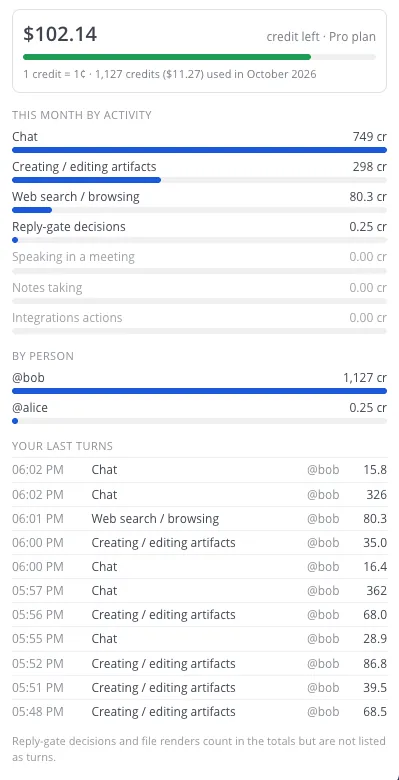
The Usage tab splits spend by activity and by person. What things cost in our tests (1 credit = 1¢):

Measured credit cost per activity
ActivityCredits
Short chat answer~16
4-slide deck, built and rendered35–68
Web research with a source~80
30-minute meeting notes (estimate)~90
Deciding if a message is for Beni0.25

Measured on 20 October 2026. Long conversations cost more, because Beni re-reads more context each time.

Usage tab: $102.14 credit left on the Pro plan, credits this month by activity and by person, and a list of the last turns with their cost.

Questions teams ask first.

Beni holding a notepad with a checked item and a pencil
Will Beni answer every message in our channels?

No. Beni answers when you mention it, and otherwise a quick check decides whether a message is meant for it. Most of the time, it stays quiet and lets people talk.

Can my teammates see what I ask Beni privately?

No. Your DMs go to your own Beni, with its own memory and sandbox. The team Beni and other people's Benis can't read them. What you say in a team channel is shared with that channel.

Who can approve what Beni does?

For actions in your connected apps, only the person who asked, or a workspace admin. For a change the channel agreed on, like a slide title, any member of that channel can confirm it.

Can we change what Beni made?

Yes. Open the file in the editor inside the live panel, or download the .pptx, .docx or .xlsx. If you and Beni edit at the same time, your version is kept as its own copy.

Which AI does Beni use, and is our data used for training?

Beni is model-agnostic and picks the right model for each task: a small, fast model decides whether a message is meant for Beni, and a stronger one does the work. Today those are Anthropic's Claude models, through Anthropic's commercial API; the open platform Beni runs on supports other providers too. We don't use your data to train models, and Anthropic's commercial terms say it doesn't train on API customer content.

Does it work in Slack and Teams today?

Yes, as private pilots. In Slack, Beni answers DMs and mentions for now, and its live panel opens from a link. Our own workspace, Benigo, runs as a private pilot too.

What happens when we run out of credits?

You get a heads-up when 20% of the month's credits are left. At zero, Beni tells you and stops before running the model, so there is no surprise bill. Top up or wait for next month. Admins can also give each person a monthly credit cap; when someone reaches theirs, the rest of the team keeps working.

Beni, a line drawing of a smiling person in a shirt

Bring Beni into your team.

Add Beni to your Slack or Teams, or try it in a Benigo workspace. We're starting with small teams.

Add to Slack Add to Teams Try it out

No card, and billing isn't live yet. While we're in pilot we switch each new Beni on by hand and tell you in Slack, Teams or by email when it's ready.